 Ideaflow Vault
If you've recently looked at monetization options for your blog or niche website, you've likely run into a wall of abbreviations: RPM, CPM, CPC, and CTR. These acronyms represent the fundamental building blocks of digital publishing and online advertising.
Understanding these terms isn't just about passing a vocabulary test. It is about understanding how to measure your website's financial health, diagnose underperforming pages, and project future earnings. Without this knowledge, you are flying blind.
Let's break down each of these ad metrics simply, show you the math behind them, and explain how they work together to create your total revenue stream.
1. RPM (Revenue Per Mille)
RPM is the single most important metric for website publishers. It represents the total estimated earnings you generate for every 1,000 pageviews on your site.
Unlike other metrics which focus on individual clicks or ads, RPM gives you a holistic look at how well your website monetizes its overall traffic. It aggregates the earnings of all ad placements on a page.
Example: If your blog earned $150 yesterday from 15,000 pageviews, your page RPM would be calculated as: ($150 / 15,000) × 1,000 = $10.00. This means that for every 1,000 visitors who landed on your site, you generated $10.00.
2. CPM (Cost Per Mille)
CPM stands for "Cost Per Mille" (Mille is Latin for thousand). While RPM is a metric used by publishers to track earnings, CPM is a metric used by advertisers to track their costs.
CPM is the price an advertiser pays to display an ad 1,000 times (known as impressions). Under a pure CPM monetization model, you get paid simply for displaying the ad, regardless of whether a user clicks on it or not.
Difference between RPM and CPM: RPM tracks revenue per 1,000 *pageviews*, whereas CPM tracks cost/revenue per 1,000 *individual ad impressions*. Since a single page can contain multiple ads (e.g., 4 ads per page), your page RPM is usually much higher than the CPM of any single ad block on that page.
3. CPC (Cost Per Click)
CPC is the amount of money you earn (or an advertiser pays) every time a user clicks on an ad displayed on your page.
If you monetize with a network like Google AdSense, a significant portion of your earnings will be based on CPC. Different niches have wildly different CPC benchmarks. A personal finance blog might see CPCs of $2.50 to $8.00+, whereas a recipe blog might see CPCs of $0.15 to $0.50.
Example: If an ad on your site is clicked 20 times and generates $10 in total earnings, your average CPC for those clicks is: $10 / 20 = $0.50 per click.
4. CTR (Click-Through Rate)
CTR measures the percentage of your website visitors who actually click on an ad. It is a direct indicator of how relevant and well-placed your ads are relative to your content.
Example: If an ad unit is displayed 10,000 times on your website and receives 150 clicks, its Click-Through Rate is: (150 / 10,000) × 100 = 1.5%. A standard website CTR for display ads typically sits between 1.0% and 3.0%.
How They All Work Together
These metrics do not exist in isolation. They form a mathematical loop that determines your daily website earnings. If you know your traffic, CPC, and CTR, you can easily calculate both your expected RPM and your total monthly earnings.
Here is how the loop connects:
If your niche website maintains a healthy **2.0% CTR** and averages a **$0.40 CPC** across ads, your page RPM is: 2.0 × $0.40 × 10 = $8.00 Page RPM. If you get 50,000 monthly pageviews, you'll earn: (50,000 / 1,000) × $8.00 = $400/month.
| Metric | Who Tracks It | What It Measures | Target Benchmarks (Avg) |
|---|---|---|---|
| RPM | Publisher (You) | Total earnings per 1,000 pageviews | $5.00 – $40.00 (depends on niche) |
| CPM | Advertiser / Network | Cost of displaying 1,000 ad impressions | $0.50 – $10.00 per ad unit |
| CPC | Both | Earnings generated per single ad click | $0.20 – $3.00 (varies by country) |
| CTR | Publisher (You) | Percentage of impressions that get clicked | 1.0% – 2.5% (excellent if > 3%) |
How to Optimize Your Metrics to Increase Revenue
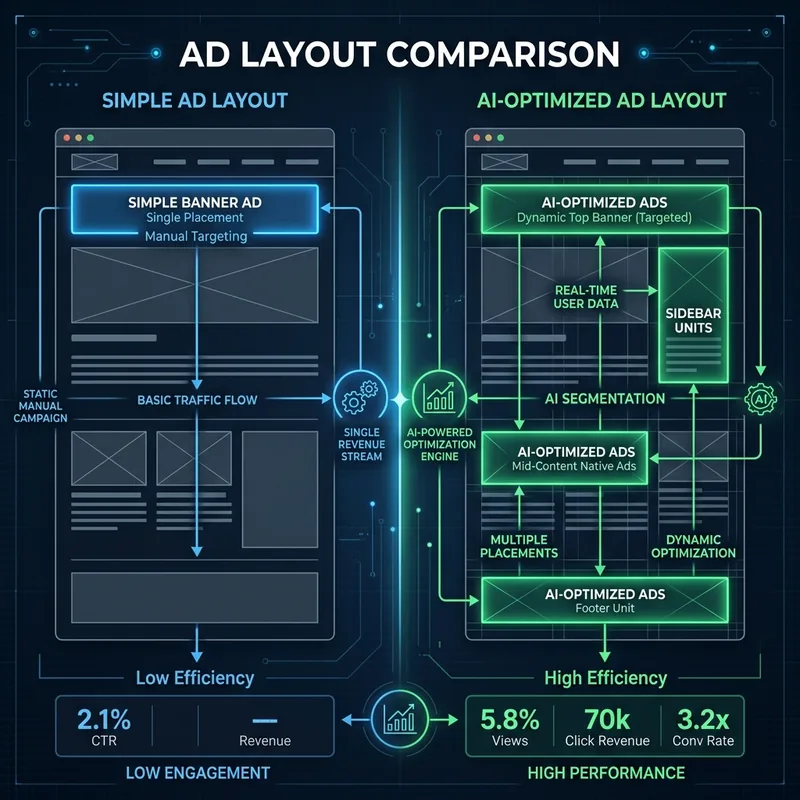
To make more money, you either need more traffic (views) or you need to optimize your layout to increase one of these key variables:
- To Increase CTR: Experiment with ad placement. Placing ads "above the fold" (visible without scrolling) or within the content naturally increases views and clicks. Avoid cluttering pages with too many ads, as users will ignore them.
- To Increase CPC: Write about topics with high advertiser demand. Advertisers pay more to display ads next to purchase-intent content (e.g. SaaS reviews, insurance, financial planning).
- To Increase RPM: Focus on drawing search traffic from high-paying locations (like the US, UK, and Canada) and internal linking. Keep readers on your site longer so they browse multiple pages per session.
Test Different Scenarios Instantly
Curious how a 0.5% increase in your CTR or a $0.10 bump in your CPC will impact your monthly side-hustle revenue? Play with the metrics directly inside our interactive ad calculator.
Open Interactive Ad Calculator →💡 Check Out Our AdSense Guide
If you're looking to start monetizing, check out our newly updated Google AdSense Approval Checklist. It outlines the exact steps to get your site ready for approval on the first try.